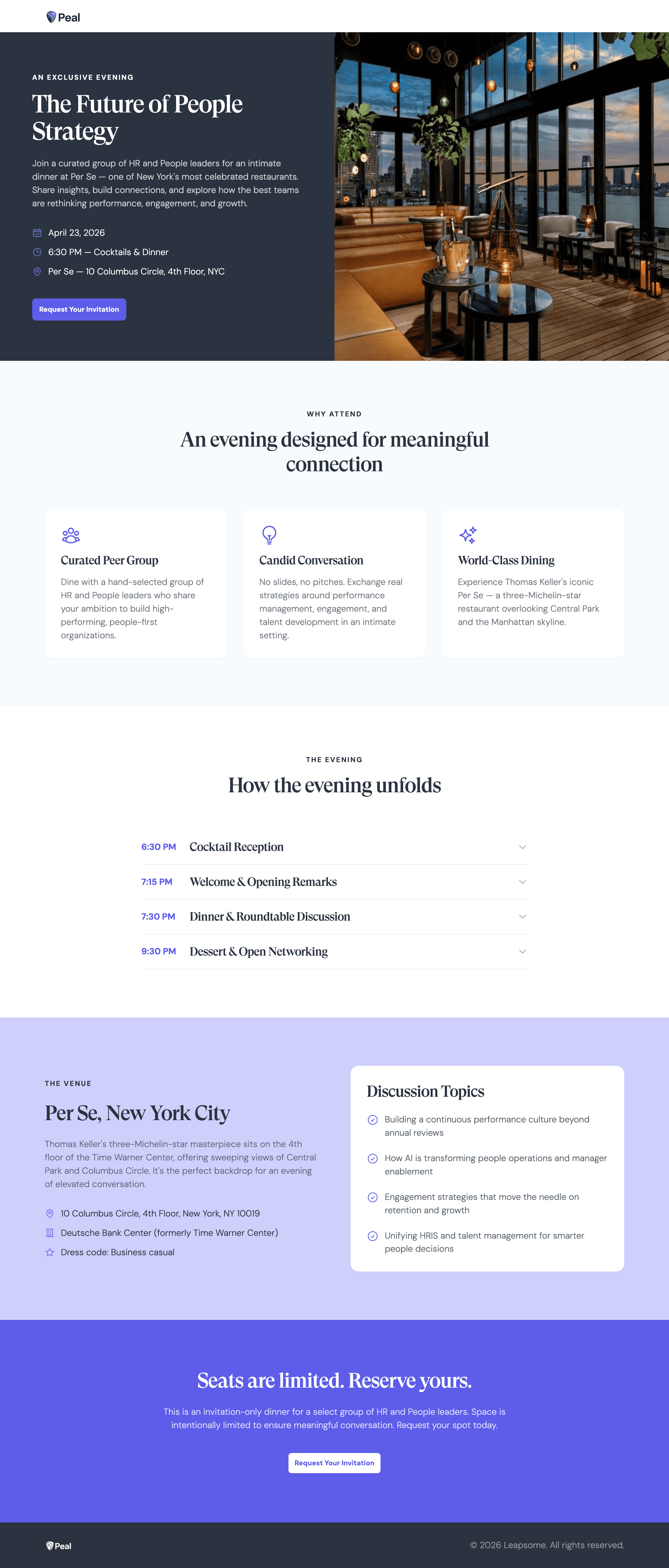
An event invite page is a landing page that sells attendance by leading with what attendees will walk away with, then makes registration the obvious next step. The strongest invite pages open with the outcome, back it with agenda and speakers, and keep logistics clear.
What Mutiny’s event invite blueprint creates
Mutiny’s event invite blueprint builds a conversion-focused event page with these sections:
Split-screen hero. Event title in bold type with key details and CTA, a full-bleed image alongside.
Value section. A headline and two to three benefit columns answering the question every invitee asks: what will I get out of this?
Agenda. Tabs or an accordion so attendees explore topics without a wall of text.
Speakers grid. Headshots, names, titles, and bios, when speakers are confirmed and worth featuring.
Logistics block. Date, time, location, and venue, organized so nothing gets missed.
Social proof. Past attendee logos, confirmed company logos, satisfaction stats, and testimonials, each shown when the data exists.
That structure doubles as a template for a strong event page, whether you build it in Mutiny or by hand.
Why do great event invite pages matter?
An event invite page decides whether your event investment pays off, because the page is where an invitee decides the event is worth their time. Leading with the outcome and showing who else will be in the room converts far better than a form that opens with logistics.
The lift is measurable: dynamic, personalized registration flows convert at 24.4% versus 11.6% for static flows, roughly a 2x uplift. Registration is only half the battle, since live B2B webinars average a 35-45% attendance rate, so the page has to earn both the sign-up and the show-up.
When should you use an event invite page?
Use an event invite page whenever attendance has to be sold, not just announced. Three situations call for one:
Executive dinners and VIP events. The page should match the experience you are promising, signaling the event will be just as deliberate.
Webinars and virtual events. A page that communicates the takeaways and who else will attend converts better than a generic registration form.
Field events and roadshows. A page that speaks to each city’s audience drives more registrations than a one-size-fits-all event site.
How to create an event invite page, step by step
Creating an event invite page means selling the outcome and removing friction from registration. Work through it in this order:
Define the audience and what they will walk away with.
Lead with the outcome in a bold, focused hero.
Make the agenda scannable with tabs or an accordion.
Feature confirmed speakers and real social proof.
Keep logistics clear and the registration CTA obvious.
Mutiny compresses this into minutes. Tell it who the event is for, what attendees will get, and the format, and it builds the full page with no waiting on design or web.
What makes a great event invite page?
Lead with the outcome attendees care about.
Answer “what will I get?” in the first screen.
Make the agenda easy to scan.
Show who else will be in the room.
Keep one clear path to register.
A logistics-first page vs. an outcome-led invite
Most event pages bury the value under logistics. An outcome-led page leads with what attendees gain and makes registering the obvious next step:
Dimension | Logistics-first page | Outcome-led invite |
|---|---|---|
Hero | Date, time, location | The outcome attendees want |
Value | Buried | Front and center |
Agenda | Wall of text | Scannable tabs |
Proof | Missing | Logos, stats, testimonials |
Registration | An afterthought | The obvious next step |
The fastest way to build an event invite page: Mutiny
Mutiny is the GTM agent built for customer-facing work and workflow automation. The agent builds the full event page from your context, and teams turn it into a repeatable routine so every webinar, dinner, and roadshow city gets its own page without a design queue. It is built for the marketing leaders running events and the ABM teams hosting executive experiences.
Teams using Mutiny create assets 4.5x faster with 100% design satisfaction, so a polished invite goes live even on a tight turnaround.
“It’s been game-changing to give our sellers Mutiny’s design capabilities. Right off the bat, it’s reducing dependency on marketing and expediting time to publish significantly.”
Gabriel Ginorio, Senior Growth Manager, Rippling
Use this blueprint to build an event invite page for your next event in minutes.
Related blueprints
Explore the rest of the blueprint library: the Vertical Landing Page, Cold Outreach, Case Study Round-Up, and 1:1 ABM Page blueprints all help fill and follow up on an event.
Last updated: July 15, 2026
Frequently asked questions
What is an event invite page?
An event invite page is a landing page built to sell attendance. It leads with what attendees will walk away with, surfaces the agenda and speakers clearly, keeps logistics organized, and makes registration the obvious next step, so the right audience converts into confirmed attendees.
What should an event invite page include?
A strong event invite page includes a bold hero with the event title and CTA, a value section answering what attendees will get, a scannable agenda, a speakers grid when speakers are confirmed, a clear logistics block, and social proof like past attendee logos, satisfaction stats, and testimonials.
How do you increase event registrations?
Lead with the outcome rather than the logistics, make the agenda easy to scan, and show who else will be in the room. Personalized, dynamic registration flows convert at roughly twice the rate of static ones, so a page tailored to the audience turns more of the right visitors into registrants.
How is an event page different from a registration form?
A registration form collects details. An event page sells attendance first, then collects the registration. It communicates the value, the agenda, the speakers, and the proof that the event is worth attending, which lifts both the number of registrations and the share of registrants who actually show up.
How quickly can you build an event invite page?
With Mutiny, you share who the event is for, what attendees will get, and the format, and the agent builds the full page in minutes: hero, value section, agenda, speakers, logistics, and social proof. That means a polished page even on a tight turnaround, with no design or web queue.
How much does Mutiny cost?
Mutiny offers Free, Business, and Enterprise custom plans (starting at $30k). Teams can start building event pages on the Free plan, and larger teams move to Business or Enterprise for scale, controls, and support. See the pricing page for current details.
Event Invite
A conversion-focused event page that communicates value and agenda clearly enough to turn the right audience into confirmed attendees.
When to use this blueprint
You're hosting a field event, webinar, or executive dinner and need a page that sells attendance
You're targeting a specific audience and need the page to reflect why this event was built for them
You have a tight turnaround and can't wait on design or web to build something from scratch