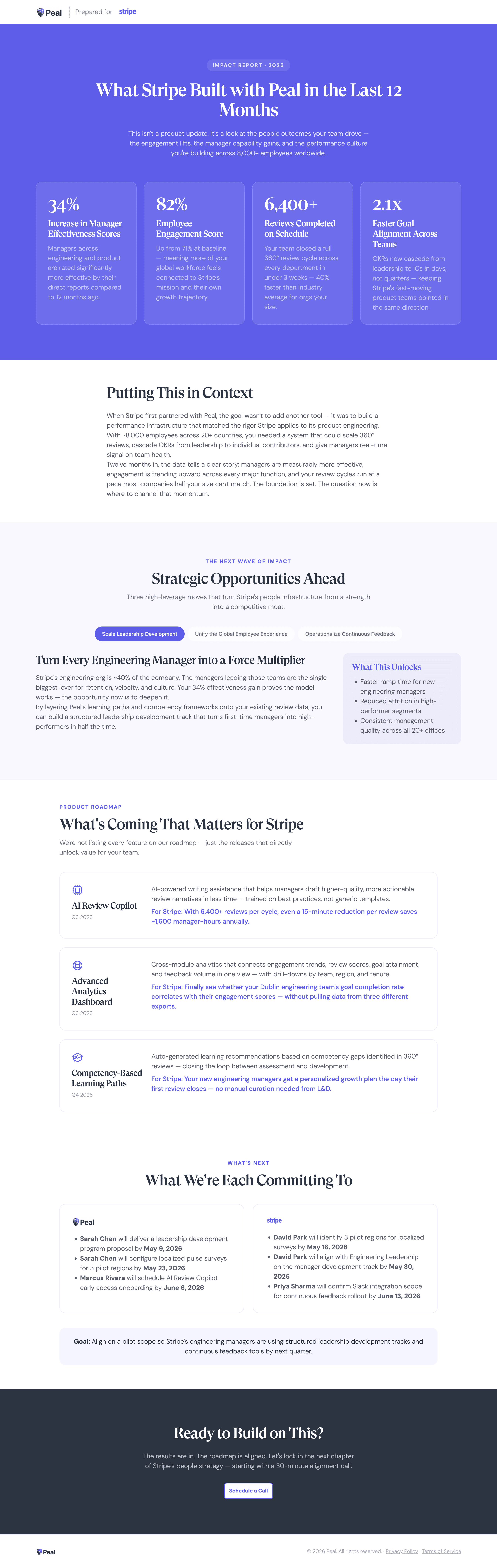
A customer impact report is a page that translates a customer’s product usage into business outcomes, connects those results to their original goals, and frames the next opportunity. The strongest impact reports tie every stat to a business outcome, then use that proven value to open a growth conversation ahead of renewal.
What Mutiny’s impact report blueprint creates
Mutiny’s impact report blueprint builds a personalized value review with these parts:
Co-branded header. Your logo and the customer’s side by side, signaling a page built for them.
Goal-framing hero. A headline that names the customer and frames the story around their results.
Impact stats. Large stat callouts, each with a one-line business translation that frames the number as a business outcome.
Impact in context. A short narrative connecting the results to the goals the customer started with.
Strategic opportunities. What the customer should do next, each with a concrete “What This Unlocks” callout, turning a renewal into a growth conversation.
What’s coming. Roadmap items framed around what they unlock for this customer, when real roadmap context exists.
Mutual commitment. Named owners and real dates on both sides.
That structure doubles as a template for what a strong impact report should contain, whether you build it in Mutiny or by hand.
Why do impact reports drive renewals and expansion?
Impact reports drive renewals because they start the contract conversation from proven value, so the customer sees what they have achieved and what they would walk away from. Once the value is clear, the expansion ask lands as the logical next step.
Retention now runs on demonstrated value: TSIA reports that 56% of companies use analytics to identify expansion opportunities, and net revenue retention in 2026 is built on value realization. Expansion is where growth comes from: in Cust’s 2026 State of Customer Success, the median B2B SaaS net revenue retention across 105 public companies is 122%, with the top decile above 155%.
When should you use an impact report?
Use an impact report whenever proven value should shape the next conversation. Three moments call for one:
Renewal positioning. Send it 60 to 90 days before renewal, so the value is clear before the contract conversation starts.
Expansion conversations. When a customer has succeeded with one use case, an impact report gives the expansion ask a foundation.
Executive alignment. When a new executive joins or a champion moves on, an impact report gives them the full context without a retrospective call.
How to create a customer impact report, step by step
Creating an impact report means turning usage into a business story and pointing it at what comes next. Build it in this order:
Name the account and frame the story around their goals.
Lead with impact stats tied to business outcomes.
Put the results in context against the goals they started with.
Frame strategic opportunities with a clear “What This Unlocks” for each.
Preview what’s coming when real roadmap context applies.
Lock mutual commitments with named owners and dates on both sides.
Mutiny compresses this into minutes. Tell it the account, the two or three biggest results, and the opportunities you want to frame for what is next, and it builds the full page. The more specific the outcomes, the more compelling the report.
What makes a great impact report?
Tie every stat to a business outcome.
Connect results to the customer’s original goals.
Frame the next opportunity around what proven value unlocks.
Keep it executive-ready, so a skimming reader gets the story.
Lock accountability with owners and dates on both sides.
A usage recap vs. an impact report
A usage recap tells the customer what your product did. An impact report tells them what they achieved and what to do next:
Dimension | Usage recap | Impact report |
|---|---|---|
Metrics | Product actions | Business outcomes |
Framing | What the product did | What the customer achieved |
Forward look | None | Strategic opportunities and roadmap |
Renewal effect | A report they file | A growth conversation |
Accountability | None | Owners and dates on both sides |
The fastest way to build an impact report: Mutiny
Mutiny is the GTM agent built for customer-facing work and workflow automation. The agent builds the full impact report from the account’s results, and teams turn it into a repeatable routine so every customer gets a value review each quarter without a CSM starting from scratch. It is built for the customer success and account teams inside the sales organizations that own retention and expansion.
Teams using Mutiny create assets 4.5x faster with 100% design satisfaction, so a value review is ready for every account, every quarter.
“My champion said nobody gave her anything like what I gave her. This makes it so much easier for me to show them everything that we’ve walked through and done.”
Jeff Goldberg, Account Executive, Kaizen
Use this blueprint to build a customer impact report for your next renewal in minutes.
Related blueprints
Explore the rest of the blueprint library: the Forward Looking Strategy, Expansion ABM Page, Executive Business Case, and Deal Room blueprints pair naturally with an impact report across the customer lifecycle.
Last updated: July 15, 2026
Frequently asked questions
What is a customer impact report?
A customer impact report is a page that translates a customer’s product usage into business outcomes, connects those results to their original goals, and frames the next opportunity. It is built to start renewal and expansion conversations from a position of demonstrated value.
What should an impact report include?
A strong impact report includes a co-branded header, a goal-framing hero, impact stats tied to business outcomes, a narrative connecting results to the customer’s goals, strategic opportunities with a “What This Unlocks” callout for each, an optional roadmap preview, and mutual commitments with owners and dates.
How is an impact report different from a QBR or usage recap?
A usage recap reports product actions like campaigns run or assets created. An impact report translates those into business outcomes, connects them to the customer’s goals, and frames what to do next. That shift turns a routine review into a growth conversation ahead of renewal.
When should you send an impact report?
Send an impact report 60 to 90 days before a renewal so the value story lands before the contract conversation, when a customer has hit milestones you want to turn into expansion, or when a new executive or champion needs context on the relationship.
How do you build an impact report quickly?
With Mutiny, a CSM names the account, the two or three biggest results, and the opportunities to frame for what is next, and the agent builds the full page: impact stats, context, strategic opportunities, and mutual commitments. That produces a value review in minutes instead of starting from scratch each quarter.
How much does Mutiny cost?
Mutiny offers Free, Business, and Enterprise custom plans (starting at $30k). Teams can start building impact reports on the Free plan, and larger teams move to Business or Enterprise for scale, controls, and support. See the pricing page for current details.
Impact Report
A personalized impact report that translates product usage into business outcomes, previews what's coming next, and makes expansion feel like the logical conclusion rather than a sales ask.
When to use this blueprint
You're a Customer Success Manager heading into a renewal and want the value story told before the contract conversation starts
A customer has hit meaningful milestones and you want to turn that momentum into the next opportunity
You're making an expansion ask and need to prove what's already working before you make the case for what's next